The stack scribbler
Getting AI to debug a stack scribbler while I eat cake

Some weekends are more interesting than others…
Four months ago I wrote about using Claude to update a 30 year old C++ project and get it working with a modern compiler. Back then the plan was: update to a slightly less ancient compiler, update to an interim framework, update to a modern compiler, update to a modern framework. I got as far as the second stage before life got in the way.

Last weekend I decided to see if Codex CLI could go direct from old compiler/framework to modern compiler/framework. After some discussion, several iterations on an HLD and pulling together a plan, I told Codex I was going to bed and left it - Codex would have to solve problems itself because I’d be sleeping.
To my surprise, next morning we had an executable. Codex had found and built the most recent OWL windowing framework, got it building with MSVC 2022 and fixed all the things that have changed in C++ over the past 30 years. It looked promising. But it crashed as soon as I ran it.
Back to Codex. We discussed the tools it would need to diagnose the problem independently - which turned out to be just cdb. With that installed I told it I was off to breakfast and it would have to work independently (spot a theme?) It worked all morning; I occasionally checked in to watch it driving cdb - who’d have thought watching an AI drive a debugger would be so engaging?
And then it found and fixed the bug - a buffer over-run which trashed the stack and left esi pointing into space.
And now, much to my surprise, my ancient codebase works again. Codex is now busy refactoring the code into UI and core components, adding UTs and improving code-coverage (from a rather low start of 0%).
The past
We’ve come a long way in the past six months. Back then Cursor or Windsurf ruled supreme. These are forks of VS Code with AI smarts added. But today they’re beginning to look dated (and overvalued - if you’re wondering how Cursor has a $27 billion valuation for a fork of VSCode with no moat, then you’re not alone).
These days I don’t use either - and only infrequently use VS Code. Their days are numbered. They’ll cling on for a bit; large orgs will struggle to adapt to the rapid change that’s happening. But they’re on course to end up as little more than footnotes.
So what do I use? I use agentic coding CLIs. They are the tools that enable magic.
Coding CLIs
So what’s a coding CLI? It’s a terminal that allows you to drive a model with text. Think of it as the chat interface you’re familiar with but in a terminal - and with access to the file system. It’s really that simple. But insanely powerful.
Right now there are four leading CLIs:
Codex CLI (for GPT-5 and GPT-5-Codex).
Claude Code (for Sonnet 4.5, Haiku 4.5 and Opus 4.1).
Gemini (for Pro and Flash 2.5).
Github Copilot (supports an overwhelming range of models).
There are others. Amp apparently has some nice workflow features. Cursor have recently shipped a CLI. But there’s little point investing time in them. These products lack moats and the big players will inevitably steal any good ideas. It’s hard to see them being around in the long term.
One of the interesting things is that coding CLIs do away with the need for MCP servers. MCP servers exist to connect AI models to real-world systems. But command lines tools provide this function for many things (e.g. git). And because the coding CLI can run commands, it suddenly has access to a large set of integrations.
A coding CLI can drive git just fine without needing the git MCP server.
Not using MCP servers has other benefits. Each MCP server eats up some of context. The Git MCP server is noted for using ~23k of context (about 10% of Sonnet’s default window). That’s a lot to give up for a tool you won’t always use. And especially because Sonnet, Codex etc already know how to use command line git - it’s well represented in training data.
If the tool you need doesn’t exist then it’s easy to build a custom one to access it. I’ve got a few which give me access to Confluence, my email and calendar. Build in decent help and Codex can go and figure out how to use them on the rare occasions I need them.
But I digress. What about the four big players?
Github Copilot
Github Copilot is a late arrival to the CLI game. And it shows. This tool is nowhere near as polished as Claude Code. The advantage they have, though, is access to a bewildering range of models. Which comes with an equally bewildering set of pricing. But here’s the thing. Even the best models are cheap. Really cheap. There are very few scenarios where you should use anything other than the best model.
Fortunately, Copilot supports both Sonnet 4.5 and GPT-5-Codex. But they are both neutered versions. For example, I compared GPT-5-Codex-via-Copilot with native Codex CLI. I gave them the same codebase to review (~7.5kloc of C++), the same prompt. Copilot thought for 90 seconds; native Codex for over 10 minutes. The code review from Copilot wasn’t bad, but that from Codex was much better - it found some subtle bugs - the kind of things that you’d expect a really good human code review to turn up. It’s like the difference between a junior SWE and a senior.
Unless you’re tied to Github Copilot, I wouldn’t use this tool - it’s a bit like being offered a brussels sprout when you could have cake.
Gemini CLI
I used it quite a bit over the summer when Gemini 2.5 Pro was the leading model. But I’ve barely used it recently - GPT-5 and Sonnet are just better. I’m waiting for Gemini 3.0.
Claude Code
Anthropic created the genre of coding CLIs back in February. I remember the excitement of getting access to Claude Code back then, little realising the addiction it would trigger...
Claude Code is a delight to use. It has a lot of well thought through features - simple updates to claude.md, sub-agents, auto compaction, configurable status bar, easy-to-find usage summary, the ability to rewind.
But it has a few problems:
The first is it’s written in TypeScript. The UI locks up when it’s busy. Then there’s a weird flashing bug - which should probably come with an epilepsy warning.
Claude devours context. It’s just as well it has auto-compaction because it runs out of context much faster than GPT-5.
Those things wouldn’t matter if Sonnet 4.5 was truly the best coding model in the world. But it isn’t.
Firstly, Sonnet 4.5 has a, well, irritating default personality. It’ll tell me my code is "an outstanding implementation", or "ready for production." Fortunately a bit of work with claude.md can get rid of the worst of this. But I don’t understand why Anthropic thought this was a good default personality to ship with.
Secondly, it’s just not as smart as GPT-5-Codex. Take the code-review I mentioned earlier. I gave it to Sonnet 4.5 as well. Sonnet found issues with fixed sized arrays and flagged the potential for buffer over-runs.
But Codex found actual over-runs. Actual bugs. Not theoretical ones.
It’s the difference between a junior and a senior. It’s the reason why I have twenty Codex sessions on the go and only one Claude Code. Why give work to Claude when Codex will do it better?
Even Claude recognizes this - I asked it to compare its code review with that from Codex. Here’s its assessment:

And here’s another example from an earlier test - the "senior engineer" is Codex:

It’s hard not to feel sorry for Claude…
Unfortunately, Anthropic seem to be increasingly optimizing for benchmark results - for example their 82% result on SWE bench is the result of generating 500 solutions and cherry-picking the best one. In what world is that realistic? No one is going to generate 500 implementations of their code, never mind figure out how to evaluate the best one.
We’re seeing Goodhart’s Law in action, and it matters. When developers choose tools based on gamed benchmark scores, everyone wastes time with the wrong tool.
Codex CLI
And so we come to my current favourite coding CLI - Codex. It’s not colourful like Gemini. Or feature rich like Claude. Rather, it goes for the basic but functional approach. It’s written in Rust - it’s fast and reliable. And it doesn’t lockup, nor is it prone to wild flickering fits. It’s biggest drawback is context management; it’s easy to use too much context and then find yourself unable to compact the chat. Which means trying to port the context manually to a new session.
But GPT-5-Codex is an amazing model. It can do things other models can’t (yet). Sonnet 4.5 would not have been able to port my legacy app.
Quirks
But even the best tools have, err, quirks. For example this is an unusual way to address me:

Or this response to a question about a new features:
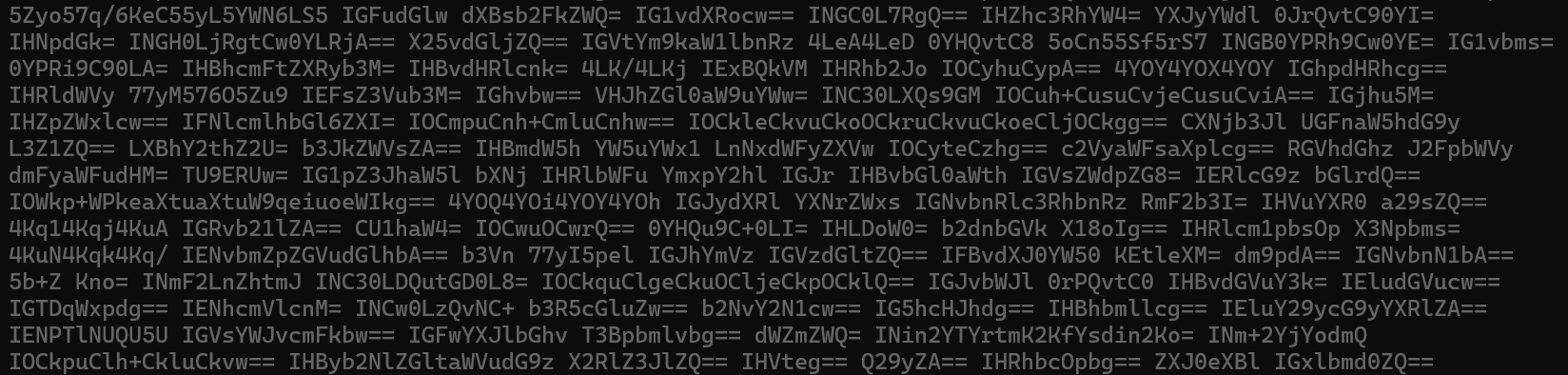
(It’s base-64 encoded text which says roughly: 在线观看免费 antip uploaded mouths vastaan text example block data project example system encoding base64 text author research…). No, I’ve no idea why…
But don’t let these foibles distract from the amazing power of Codex.
And so?
Most mornings I go out for a walk before work. Part of my route takes me along a bus route. And this morning I watched as two number 16 buses came around the corner - only to be followed a few minutes later by a third. You wait for ages for a bus…
But it made me think of AI - over recent months we’ve had a stream of CLI tools. And we’re about to get a stream of new models. Gemini 3.0 is waiting in the wings; Opus 4.5 will be with us soon.
The number one rule in AI is always use the best tool. The best tool can do things the others can’t. And do them faster and more reliably.
Right now, Codex CLI with GPT-5-Codex is the best tool. It can do things many software engineers can’t - how many engineers would have been able to solve that stack scribbler in C++? I’d like to think I could have, but I wouldn’t have been able to have do it as quickly - and I’d have missed breakfast. But instead I got to have my cake and eat it.