
When it comes to searching docs, conventional wisdom says “use RAG”. If you’re not familiar with RAG (Retrieval-Augmented Generation), it works like this.
First you store your docs in a vector database (which stores text as vectors that capture semantic meaning, making it efficient to find related content).
Then when you make a query, RAG searches the vectorized database to pull out relevant information.
This info is then added to your query before the LLM gives you the final answer.
The idea is to give the LLM a query and some relevant content. And then marvel as magic ensues.
But it doesn’t always work well. The quality of the response depends on the quality of the RAG retrieval. Which can vary. The search might find the wrong data. There might be too much relevant context. Plus you need to upload and vectorize your docs first, which makes it more complex.
What if there were a simpler way to achieve the same end? What happens if you feed your docs straight into a model? That’s what I decided to find.
Conclusions
There are details of my testing below. But if you’re short of time here are the spoilers:
Gemini is pretty good. It has a 2M token context window and can handle real-world docs sets. It’s a bit slow, though.
Claude & GPT4o don’t (yet) have big enough context windows to be really useful.
RAG is still the winner. A vector db plus Claude was impressive.
Massive context windows aren’t (yet) the best solution. That may change in future, but right now the sweet spot remains RAG. And with RAG getting easier to use maybe you can still be lazy and use RAG.
Claude
I like Claude, so I started with it. The docs I used were a set of 17 PDF files, 30MB in size and containing 1.67 million words (I know this because Claude wrote me a Rust tool to count the words in the PDF files).
The new Claude Projects feature seemed ideal for the task. Add your docs to a project and then you can search them easily without needing to reupload.

But. The size of a project is limited. I added three files…
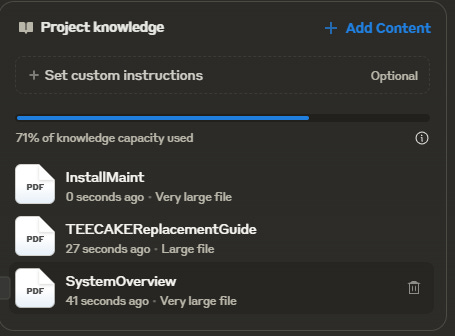
…and then I couldn’t add any more.

Hmm. Maybe PDF are inefficient. Could I fit more if they were text format? Claude to the rescue - I soon had a script (Python this time) to batch convert PDFs to text files. My word count tool confirmed the total words remained at 1.67 million (as did reading some of the docs) so back to Claude to try uploading.

I uploaded the same three files. This time it was worse! I was using 77% versus 71% for the PDF versions. Oh dear.
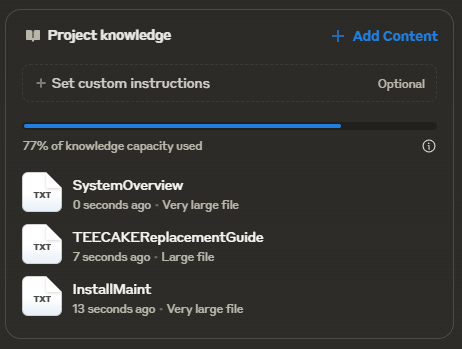
On the positive side, Claude was happy to answer questions about the content I had managed to upload. It told me what I should do if my system wasn’t working and explained some of the features. Kinda cool. But irritating as I’d have to work out what doc to upload first before I could ask questions.
There were ~77,000 words in the docs I uploaded. So a thousand words equals 1% of the knowledge capacity. As I previously discovered you need to leave some headroom otherwise you can’t ask any questions. That puts an upper limit of eighty to ninety thousand words.
For our 1.67million words, we’d need a context window ~20x larger than Claude’s current 200k tokens. So 4M tokens. Enter Gemini…
Gemini
The paid version of Gemini - Gemini Advanced - offers a 2M token context window. Not quite 4M, but 10x larger than Claude. Gemini doesn’t have an equivalent of projects, so I uploaded all the docs in one go. To my surprise Gemini seemed happy to deal with all 17 docs (token counts aren’t an exact science - being out by a factor of 2 isn’t a great surprise).
Then I started my questioning. Gemini wasn’t fast - answers took ~50 seconds to generate. But the answers were good. Plus it provided citations.
I asked someone who knew the docs well for an opinion. Their view? Gemini’s answers were decent.
GPT4o
GPT4o lets you upload ZIP files and then ask questions on the files. So I uploaded my ZIP file of PDFs and asked a question. Under the covers GPT4o created a Python script to extract the PDFs, convert them to text and then search then for relevant information. A sort of dynamic RAG. Nice, but it’s not quick.
Worse, it didn’t work. Instead GPT4o told me how to search the docs myself. Not quite what I was hoping for.
I grabbed my text versions of the docs, zipped them up and uploaded them. ~50 seconds later I had an answer.
Not terrible. But the answers felt less polished than Gemini's, coming across more as stitched-together excerpts than coherent analysis. This made me wonder - how would these direct-to-model approaches stack up against a proper RAG implementation?
Pinecone
Enter Pinecone, a vector database plus LLM integration with GPT4o or Claude through an easy to use web UI. The free plan offers 1GB of storage - my docs took 1% of the capacity.
Using GPT4o it seemed pretty good. Not quite as detailed as Gemini - I preferred the way Gemini grouped answers. But much quicker at ~10 seconds.
Pinecone also offers Claude as the LLM...
That improved the answers - I reckon these are as good as Gemini's, and considerably quicker. For now it seems massive context windows aren’t (yet) the best solution. The future may bring models capable of handling entire document sets natively, but for now, the sweet spot seems to be a careful balance of vector search and LLM processing. It's not just about how much you can feed into a model - it's about feeding it the right information in the right way.